Per-Source Configuration
Every source in DocsGPT carries its own behavior contract — a small config object that controls how that source is chunked when it is ingested and how it is retrieved when you ask a question. This lets you tune each source independently: a large reference manual can use a different chunking strategy and retriever than a short FAQ.
You edit this config from a source’s Settings in the UI (shown below), or through the API. The settings are flat groups: Retrieval, Relevance (when the relevance model is on), Filtering, the GraphRAG groups and Chunking. Advanced settings in the add forms (upload, website and a connector’s sync) offer the same retrieval and chunking options, starting from the defaults for new sources an admin has set; the Filtering group is left out there, since it is easiest to tune after the first ingest, in the source’s settings or in Test retrieval.
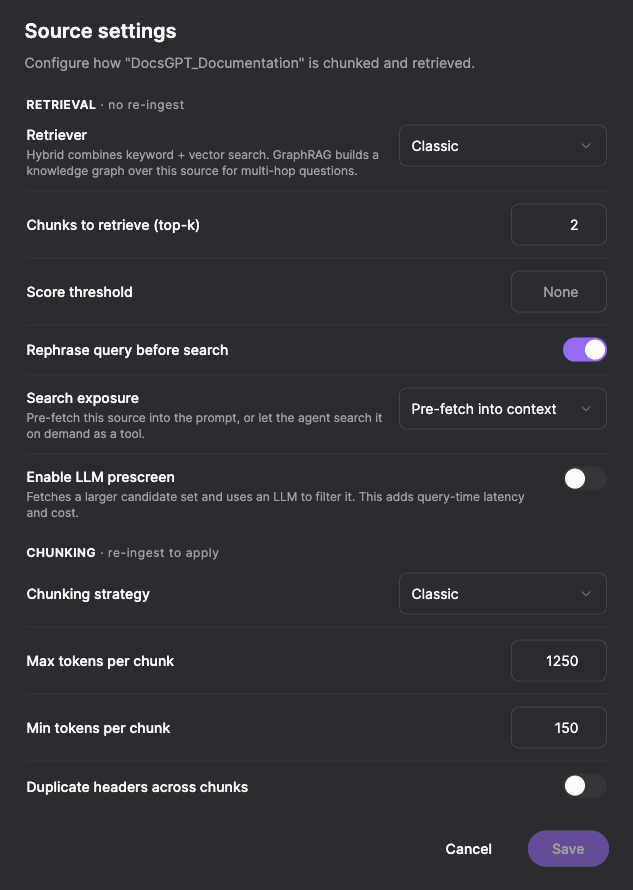
Per-source retrieval is enabled by default. Operators can turn it off instance-wide with PER_SOURCE_RETRIEVAL_ENABLED=false, in which case all sources fall back to the classic retriever regardless of their stored config. Pre-screening and relevance then do not run either, and the decision model is never called for retrieval.
Two kinds of settings: live vs. bake-time
The config has two groups of settings that differ in when they take effect:
| Group | When it applies | Re-ingest needed? |
|---|---|---|
Retrieval (retrieval.*) | Query time — applied live on the next question | No |
Chunking (chunking.*) | Ingest time — baked into the stored chunks | Yes |
Changing a retrieval setting takes effect immediately. Changing a chunking setting only affects documents ingested after the change, so you must re-ingest the source to apply it to existing content. The API response includes a requires_reingest flag to make this explicit.
Chunking configuration
Chunking decides how a document is split into the pieces that get embedded and stored.
{
  "chunking": {
    "strategy": "classic_chunk",
    "max_tokens": 1250,
    "min_tokens": 150,
    "chunk_overlap": 0,
    "duplicate_headers": false
  }
}| Field | Default | Description |
|---|---|---|
strategy | classic_chunk | Which chunking algorithm to use (see below). |
max_tokens | 1250 | Upper bound on chunk size in tokens. |
min_tokens | 150 | Lower bound; small fragments are merged up to this size (ignored by recursive). |
chunk_overlap | 0 | Number of tokens to overlap across adjacent chunks (used by recursive). |
duplicate_headers | false | Repeat section headers into each child chunk for context. |
Available chunking strategies
| Strategy | Behavior |
|---|---|
classic_chunk | The default token-window splitter. An empty config reproduces DocsGPT’s historical chunking byte-for-byte. |
recursive | Recursive splitter on natural boundaries (paragraphs, lines, sentences) with token overlap. Chunks are packed up to max_tokens and min_tokens is ignored entirely (changing it does not affect recursive chunks), so recursive output changes even with chunk_overlap: 0. |
markdown | Splits along Markdown structure (headings, sections) — good for docs and wikis. |
parent_child | Embeds small child chunks for precise matching but carries a larger parent window in metadata, so the model still sees surrounding context. |
semantic | Embeds sentences and splits where meaning shifts (at the 95th-percentile cosine-distance gap between adjacent sentences), falling back to recursive on failure. Produces topically coherent chunks at the cost of extra embedding calls during ingest. |
Chunking is bake-time. After changing strategy, max_tokens, min_tokens, chunk_overlap,
or duplicate_headers, re-ingest the source so existing chunks are rebuilt. Re-ingesting a website, GitHub or
connector source runs a sync of it, which fetches its pages or files again.
Retrieval configuration
Retrieval decides which chunks are pulled in to answer a question. These settings apply live.
{
  "retrieval": {
    "retriever": "classic",
    "exposure": "prefetch",
    "chunks": 6,
    "score_threshold": null,
    "rephrase_query": true,
    "prescreen": null,
    "reranker": null,
    "graph": {
      "seed_strategy": "entities",
      "passage_nodes": true,
      "blend_vector": true
    }
  }
}| Field | Default | Description |
|---|---|---|
retriever | classic | Retrieval strategy: classic, hybrid, or graphrag. |
exposure | prefetch | How retrieved context reaches the model: prefetch or agentic_tool (see below). |
chunks | 6 | Final number of chunks (top-k) returned to the answer. Range 1–500. Set here, it overrides whatever a request asks for. |
score_threshold | null | Minimum similarity score, shown as Similarity threshold in the Filtering group: it filters on the retriever’s own similarity, not on the relevance model’s score. Honored by pgvector, MongoDB Atlas, Qdrant and Milvus (MongoDB Atlas scores cosine as (1 + cos) / 2, so 0.8 there is cosine 0.6; Qdrant’s score follows QDRANT_DISTANCE_FUNC, cosine by default); FAISS, Elasticsearch and the hybrid retriever ignore it — the config API returns a warnings entry when you set it on one of those. |
rephrase_query | true | Whether to run a query-rephrasing side-call before retrieval. |
prescreen | null | Optional LLM screening (see below). null = off. A source sets this or reranker, never both. |
graph | see GraphRAG | How the graphrag retriever walks the graph: seed_strategy, passage_nodes, blend_vector. Ignored by the other retrievers. |
reranker | null | This source’s relevance: null is off, {"type": "decision", ...} scores its chunks with the decision model while the operator has enabled it. A source sets this or prescreen, never both. |
Who wins: source config or the request?
A source that has configured retrieval.chunks outranks the value sent with a
request. The owner tuned top-k for that corpus, so a client cannot raise or
lower it per call. Sources left at the default still let the request decide.
chunks is a total for the request, not a count per source: a request with
chunks: 6 over three sources takes two chunks from each. Every attached source
still gets at least one chunk, so with more sources than chunks the answer
receives one chunk per source (eight sources at chunks: 6 return eight
chunks). A source counts as configured when its stored
value differs from the default, so a source saved while the default was 2
keeps 2 as its own setting.
Requests are also bounded: chunks is clamped to 0–500, and 0 still means
“skip retrieval for this turn”.
Retrievers
classic— Vector similarity search. The default and a safe choice for any vector store.hybrid— Fuses vector search with full-text keyword search using Reciprocal Rank Fusion, which improves recall for exact terms, codes, and names that pure vector search can miss.graphrag— Knowledge-graph retrieval. Set indirectly when you enable GraphRAG on a source. See GraphRAG.
Keyword search for the hybrid retriever is currently implemented only for the pgvector vector store. On other stores (FAISS, Qdrant, Milvus, etc.) the keyword half returns nothing, so hybrid quietly behaves like classic (vector-only).
Exposure: prefetch vs. agentic tool
exposure controls how a source’s content is delivered to the model:
prefetch(default) — DocsGPT retrieves the top chunks up front and injects them into the prompt before the model answers. Best for focused Q&A over a source.agentic_tool— The source is exposed to the model as a search tool it can call on demand, deciding when and what to look up (browse-as-you-go) rather than receiving a bulk prefetch. This is the default exposure for Wiki sources.
Pre-screening (LLM screening)
Pre-screening adds an optional map-reduce step between retrieval and answering: a base retriever fetches a wider set of candidates, an LLM screens them in batches, and only the most relevant survivors are passed to the answer. It improves precision on noisy sources at the cost of extra query-time LLM calls, so it is off by default. In a source’s settings it is LLM screening, in the Filtering group: the alternative to relevance, so turning one on turns the other off. A config that sets both is refused with 400 and the message “Relevance and LLM screening cannot both be on: set reranker or prescreen, not both.”
{
  "retrieval": {
    "chunks": 8,
    "prescreen": {
      "candidate_k": 40,
      "batch_size": 10,
      "max_keep": 8,
      "model": null
    }
  }
}| Field | Default | Description |
|---|---|---|
candidate_k | 40 | Candidates fetched before screening. Must be >= chunks. |
batch_size | 10 | Candidates screened per LLM call. |
max_keep | 8 | Survivors kept after screening. Must be <= candidate_k. |
model | null | Model used for screening. null reuses the request’s resolved model. |
The screening judges the query retrieval searched with: on a follow-up turn, the standalone rephrase rather than the raw message.
A prescreen screens only the sources that set it. Sources with the same prescreen settings (max_keep, batch_size and model) are searched and screened together; the other sources are searched in groups of their own, each with its share of the document budget, so a prescreen’s max_keep never cuts their chunks.
Relevance
The decision model can score each retrieved chunk with a calibrated relevance, p(relevant): does the chunk contain information that answers the query or directly addresses it. A source whose relevance is on fetches 20 candidates instead of its usual top-k, scores them in one call and orders them by it:
| Mode in the source’s settings | reranker | What it does |
|---|---|---|
| Off | null | Retrieval as without the model. Sources created before this setting existed are off. |
| Reorder | {"type": "decision"} | Keeps as many chunks as the source would without the model, most relevant first. It changes which chunks reach the answer and their order, not how many. |
| Reorder and filter | {"type": "decision", "min_relevance": 0.3} | Also drops chunks scoring below min_relevance, always keeping at least one, so fewer and more relevant chunks reach the answer. |
The filter’s strictness is picked as Loose (0.1), Balanced (0.3) or Strict (0.5); the Filtering group takes an exact value (Minimum relevance) and the number of candidates (Candidates to score). A stored value that matches no preset shows as Custom. Relevance works with every retriever, graphrag included.
On DocsGPT-shaped documentation (ten doc sites held out from the model’s training, 1,314 queries, the top 20 of DocsGPT’s default embedder graded by an LLM judge), reordering raised nDCG@10 from .758 in embedder order to .916, and the share of relevant chunks among the six kept from .377 to .473 at the same count. A threshold of 0.1 saves about a third of the document tokens for about 7 points of recall. Those labels are one LLM judge’s grades, the queries are standalone and mostly English, and the gain on finance Q&A, web pages or Spanish sources is smaller.
{ "retrieval": { "reranker": { "type": "decision", "min_relevance": 0.1, "candidate_k": 30 } } }| Field | Default | Description |
|---|---|---|
type | decision | The decision model; the only reranker there is. |
min_relevance | null | null or 0 reorders only. Above 0, chunks scoring below it (0–1) are dropped, keeping at least DECISION_RELEVANCE_MIN_KEEP (1) and at most chunks. |
candidate_k | null | Candidates fetched and scored, 1–100 (and at most DECISION_RELEVANCE_MAX_PASSAGES). null uses 20. |
The operator turns it on
A source cannot turn the model on by itself: any user who can edit a source could otherwise make the API load a 1 GB model and spend CPU on it. One setting in .env decides:
| Setting | Default | What it does |
|---|---|---|
DECISION_RELEVANCE_ENABLED | false | Lets sources whose relevance is on use the model. While false, no source calls or loads the model, retrieval returns exactly what it does without it, and the source settings show only LLM screening (in the Filtering group). While true, the API loads the model when it starts, so the first answer does not fall back while it loads. |
The tuning settings stay in .env and never appear in the UI: DECISION_RELEVANCE_TIMEOUT (2 s, the deadline of one call), DECISION_RELEVANCE_MIN_KEEP (1), DECISION_RELEVANCE_MAX_PASSAGES (100), DECISION_RELEVANCE_CANDIDATE_TOKENS (the candidate fetch’s token budget), DECISION_RELEVANCE_CPU_PASSAGE_TOKENS (256, below) and DECISION_RELEVANCE_ROLLOUT_PERCENT (100). The rollout applies relevance to a share of conversations, by a hash of the conversation id; the rest are the control arm and keep the retriever’s output, so the two arms can be compared.
Sources searched together share one candidate pool, and a policy judges only its own sources: sources with relevance on are searched apart from those without it, and each LLM screening policy apart from both.
On a CPU
By default the model runs in the API process on the CPU, where scoring is slow. Measured with the release model on a 4-vCPU server (AMD Zen 4), scoring 20 whole chunks takes about 27 s. Where the model runs on a CPU, DocsGPT scores each chunk on its first 64 tokens plus the window that shares the most words with the query, DECISION_RELEVANCE_CPU_PASSAGE_TOKENS (256) tokens in all: about 14 s for 20 chunks and 7 s for 10 on that server, at recall@6 .812 against .853 for whole chunks. On a GPU or an API-mode server whole chunks are scored.
The admin Defaults panel shows what one call costs on your server (“Adds about N s per answer”) once the model has loaded and been timed, and warns when that is longer than DECISION_RELEVANCE_TIMEOUT: such a call times out and the answer keeps the retriever’s order. Raise DECISION_RELEVANCE_TIMEOUT, lower the candidates, or run the model on a GPU or a decision server.
When the model cannot answer
Every failure keeps exactly what retrieval returns without the model: the same chunks in the same order. That covers the model being off, loading, busy or unreachable, a call past DECISION_RELEVANCE_TIMEOUT, and a batch answered only in part.
What else uses the scores
- Each kept chunk carries its
relevanceinto the answer’s sources. The sources panel and the citation reader label it as a strong (from 0.7), possible (from 0.3) or weak match, with the percentage in the tooltip; the embeddable widget does not show it yet. - When the prompt has no room for every chunk, the least relevant one is dropped first, rather than the last.
- Sources searched in separate groups are merged most relevant first when all of them were scored.
- The agent’s search tool says “No relevant documents found” when a relevance threshold left none of the candidates, rather than “No documents found”, so the agent can search again with other words.
- Workflow agent nodes follow each source’s own
reranker: that source’s chunks are reordered (and filtered, with a threshold) among the places they held.
Where the text goes
The model runs in the API process or the stack’s own decider by default, so chunks and queries stay inside the stack. In API mode, every candidate chunk and the query are sent to the decision server you configured, the same trust boundary as an embeddings API: point DECISION_BASE_URL only at a server you trust with your sources’ content. The decision record and traces keep numbers only.
Prompt-injection scores of chunks
An agent whose injection_model guardrail screens retrieved sources scores each chunk it retrieves with the decision model during the chat. Scores are kept in a cache keyed by the chunk’s text, so a chunk is scored once and every later answer, by any agent, reads its score from the cache.
On a CPU, scoring a full-size chunk takes longer than the guardrail’s deadline, so with the default GUARDRAILS_INJECTION_LIVE_ITEMS=auto no chunk is scored during the turn: a chunk without a cached score is not evaluated the first time it is retrieved and is scored in the background right after, so the next answer that retrieves it has its score. To score retrieved chunks during the turn, run the model on a GPU-backed decision model server. See Prompt injection on a CPU.
Reviewing flagged chunks
In the source’s chunk view, a chunk whose cached score is 0.5 or more carries a badge (a chunk has a score once a chat has retrieved and scored it): Possible prompt injection from 0.5, Likely prompt injection from 0.9. Flagged only, next to the search box, lists only those. Users who can edit the source can:
- delete the chunk or edit it, which changes its text and so its score;
- mark it as safe: agents using this source then treat the chunk as clean (
owner-allowedin the journal), for this source only. Undo removes the mark. The mark is keyed by the chunk’s text, so editing the text removes it. A source can mark at most 1,000 chunks safe.
Nothing notifies the owner. The badges and an agent’s Guardrail activity panel, which links each flagged chunk, are the review surface.
| Method | Path | Who | Body / response |
|---|---|---|---|
GET | /api/get_chunks?id=<source_id>&injection=flagged | Anyone who can read the source | Each chunk carries injection: {content_hash, p, level, allowed} (p is null before it is scored, level is high, suspected or null), or injection: null while the model is off. injection=flagged keeps the flagged chunks, marked-safe ones included |
POST | /api/sources/<source_id>/injection_review | Users who can edit the source, or a token with sources:write | {"content_hash": "<sha256>", "decision": "allow" | "clear"}; returns {success, content_hash, allowed, count}, or 400 once 1,000 are marked |
Defaults for new sources
An admin sets the retrieval settings a new source starts with under Admin → Defaults, New sources, with the same retrieval and relevance controls as a source. They are copied into each source when it is created: an upload, a remote or connector source, a source made from chat attachments, a wiki. Settings a create request sends itself win, field by field, and a request that turns on LLM screening or relevance drops the other from the defaults. Saving the defaults never changes an existing source and there is no bulk apply: existing sources keep their own settings. Without saved defaults, new sources get the built-in defaults above.
The panel also shows the relevance model’s cost on this server and, while DECISION_RELEVANCE_ENABLED is false, that the administrator turns it on there; the relevance fields are hidden until then. The same page sets the guardrails new agents start with. Each save is recorded in the audit log as source_defaults_set.
| Method | Path | Who | Body / response |
|---|---|---|---|
GET | /api/admin/defaults/sources | Admins | {"retrieval": {...}, "relevance_model": {"enabled", "predicted_s", "timeout_s", "candidate_k", "runtime"}} |
PUT | /api/admin/defaults/sources | Admins | {"retrieval": {...}}, validated as a source’s retrieval config; returns the GET body |
GET | /api/sources/defaults | Any signed-in user, or a token with sources:read | {"retrieval": {...}}, to prefill a create form |
predicted_s is the measured prediction for one relevance call over candidate_k (20) chunks on this server, in the shape the call has here (best-window passages on a CPU, whole chunks elsewhere), and null until the model has loaded; reading it never loads or times the model. timeout_s is DECISION_RELEVANCE_TIMEOUT and runtime where the model runs (onnx-int8, vllm, …).
Testing retrieval
Test retrieval shows the chunks a query actually retrieves from one source, so you can tune the retrieval settings without asking questions in a chat. Open it from Settings → Knowledge, either with Test retrieval in a source’s menu or with the Test retrieval button at the top of an open source. Anyone who can use the source can run it, including team viewers.
- Type a query the source should answer.
- Adjust the retrieval settings under the query if you want to try something else. They start from the source’s saved settings.
- Click Run.
The result lists the chunks in rank order with their file name, token count, score and text, plus the retriever used, the number of chunks and the latency. The settings you try are used for that test only and are not saved; change them in the source’s settings to keep them.
The test runs the same retrieval pipeline as an answer: the same retriever, chunks, score_threshold, pre-screening and token budget. It differs in three ways:
- It never rephrases the query, as with the first message of a chat.
- It applies the source’s settings even when
PER_SOURCE_RETRIEVAL_ENABLED=false, where answers use the classic retriever.DECISION_RELEVANCE_ENABLEDstill applies, but notDECISION_RELEVANCE_ROLLOUT_PERCENT: a test has no conversation to put in an arm. - Pre-screening without its own
modeluses the instance’s default model, since a test has no chat model behind it. Settings that differ from the saved ones may use at most 20 pre-screening LLM calls (candidate_k/batch_size) and at mostDECISION_RELEVANCE_MAX_PASSAGES(100) chunks scored by the decision model.
While DECISION_RELEVANCE_ENABLED is on, a strictness picker next to the query (Off, Reorder, Loose, Balanced, Strict) runs the test again with that relevance setting. Each chunk shows its relevance, the summary says whether the model ordered the result, and Compare with retriever order lists every candidate in the order the retriever ranked it, with its relevance and what became of it: kept, promoted from past the retriever’s own top-k, or dropped. Users who can edit the source can keep the tested setting with Save to source.
Reading the scores
The meaning of a score depends on the retriever and the vector store, and the modal labels each one:
| Label | Comes from | How to read it |
|---|---|---|
| similarity | classic on pgvector, MongoDB Atlas, Qdrant or Milvus | Cosine similarity: higher is better, at most 1. This is the value score_threshold is compared with. |
| distance | classic on FAISS | L2 distance: lower is better, with no fixed upper bound. |
| RRF | hybrid | A reciprocal-rank-fusion score. It only orders the results of this query; don’t compare it across queries or with a threshold. |
| no score | graphrag, and classic on Elasticsearch | The retriever ranks chunks without a comparable per-chunk score. A graphrag source that has no graph yet falls back to classic retrieval, so its results carry the vector store’s scores instead. |
When nothing comes back and a score_threshold is set, the modal says so: lower the threshold to see the near misses.
From the API
curl -X POST https://your-docsgpt/api/sources/<source_id>/search \
  -H "Authorization: Bearer <token>" \
  -H "Content-Type: application/json" \
  -d '{
    "query": "How do I rotate the encryption key?",
    "retrieval": { "retriever": "hybrid", "chunks": 4 }
  }'
query is required (at most 2,000 characters). retrieval is optional: leave it out to use the source’s saved retrieval settings, or send a complete retrieval object (fields you leave out take their defaults, as in the table above). "compare": true adds candidates. Nothing is saved. The response:
{
  "success": true,
  "query": "How do I rotate the encryption key?",
  "retriever": "hybrid",
  "retrieval": { "retriever": "hybrid", "chunks": 4, "...": "..." },
  "total": 4,
  "latency_ms": 182,
  "chunks": [
    {
      "rank": 1,
      "text": "...",
      "title": "...",
      "filename": "security.md",
      "source": "...",
      "tokens": 212,
      "score": 0.0328,
      "score_kind": "rrf",
      "relevance": 0.91
    }
  ],
  "relevance": { "applied": true, "fallback": null, "latency_ms": 412 },
  "candidates": [
    { "rank_before": 1, "rank": null, "kept": false, "baseline": true, "relevance": 0.04, "text": "...", "...": "..." }
  ]
}
score_kind is cosine_similarity, l2_distance, rrf or null, matching the labels above; score is null when score_kind is. relevance on a chunk is the decision model’s score when it ordered the result, else null. The top-level relevance is null when the model did not run; otherwise applied is false after a failure, and fallback names the failure (timeout, unavailable, error). Each of candidates (with compare only) has its place in retriever order (rank_before), in the result (rank, null when not kept), whether it was kept and whether retrieval would have returned it without the model (baseline).
Editing the config via API
The config is edited with a PATCH to the source’s config endpoint:
curl -X PATCH https://your-docsgpt/api/sources/<source_id>/config \
  -H "Authorization: Bearer <token>" \
  -H "Content-Type: application/json" \
  -d '{
    "retrieval": { "retriever": "hybrid", "chunks": 4 },
    "chunking":  { "strategy": "semantic" }
  }'
The response echoes the stored config and a requires_reingest flag:
{
  "success": true,
  "config": { "...": "..." },
  "requires_reingest": true
}
Notes:
- A group the body leaves out (
chunking,retrieval,graph) keeps its saved value, so{"retrieval": {...}}alone changes only the retrieval settings. A group you send replaces the saved one: any field you leave out of it is reset to its default. To change one setting, send the source’s current group (fromGET /api/sources) with that setting changed. On a GraphRAG source, keep"retriever": "graphrag"inretrieval. - Invalid values are rejected with
400(strict validation on write); aretrievalwith bothrerankerandprescreensays so. - The
kindfield (classic / wiki / graphrag) cannot be changed through this endpoint — converting a source to a Wiki or enabling GraphRAG uses dedicated endpoints. - Editing requires ownership of the source or a team
editorgrant; viewers receive403.
Related
- GraphRAG — knowledge-graph retrieval for a source.
- Wiki Sources — LLM-editable living documentation.
- Embeddings — the embedding model used during ingest and retrieval.