GraphRAG
GraphRAG augments classic vector retrieval with a knowledge graph. During ingestion DocsGPT uses an LLM to extract entities and the relationships between them from a source’s chunks, and stores them as a graph alongside the vectors. At query time, a graph retriever uses Personalized PageRank (PPR) to walk that graph from the entities mentioned in your question, surfacing connected context that pure similarity search can miss — useful for multi-hop questions and queries that span related concepts.
GraphRAG is flag-gated and currently pgvector-only. It is available only when both GRAPHRAG_ENABLED=true and VECTOR_STORE=pgvector. On any other vector store the enable action is rejected.
Requirements
- A PostgreSQL database with the
pgvectorextension (VECTOR_STORE=pgvector). See PostgreSQL for User Data. GRAPHRAG_ENABLED=truein your environment.- An LLM configured for extraction. Without an override, extraction uses
LLM_NAME, so setGRAPHRAG_EXTRACTION_MODELexplicitly (see Configuration).
GRAPHRAG_ENABLED=true
VECTOR_STORE=pgvector
The graph tables live in the same pgvector database as your embeddings and are sized to the embedding dimension. If you change embedding models you must re-ingest and re-extract (see Embeddings).
How it works
- Choose GraphRAG for the source — either at upload time, or by enabling it on an existing source (see below). This sets the source’s config to
graphragmode. - Extraction runs over the source’s chunks. For each chunk, the LLM extracts entities and relations, which are written into per-source graph tables. Extraction is durable and resumable via a checkpoint, so it survives restarts and re-runs from scratch each time you re-enable it.
- Query. Questions against the source are routed to the graph retriever, which runs Personalized PageRank from the query’s entities to gather related context.
If a source has no graph yet (extraction still running or failed), the graph retriever falls back to classic vector retrieval for that source — answers keep working, they just don’t use the graph until it is ready.
Enabling GraphRAG
At upload time (recommended)
When you upload a new document, open Advanced settings and set Retriever to GraphRAG (the same dropdown also offers Hybrid). The source is created in graphrag mode and extraction is enqueued as part of ingestion — no extra step.
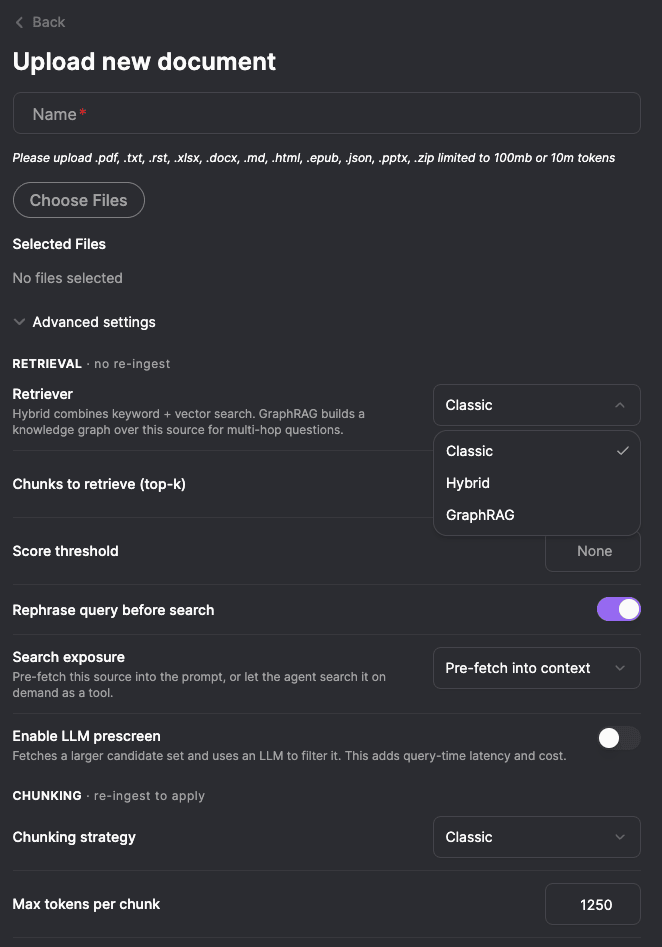
These are the same per-source retrieval settings you can change later — choosing the retriever up front just avoids a re-ingest.
On an existing source
To turn an already-ingested source into a GraphRAG source, use the Enable GraphRAG action on the source (it shows a status badge while extraction runs), or call the API:
curl -X POST https://your-docsgpt/api/sources/<source_id>/graphrag/enable \
  -H "Authorization: Bearer <token>"
The response returns a task_id for the extraction job:
{ "success": true, "task_id": "..." }Notes:
- Requires write access to the source (owner or team
editor). - Returns
400if GraphRAG isn’t available on the workspace (wrong vector store or flag off). - Re-running the action rebuilds the graph from scratch rather than no-opping against an existing one.
- You cannot switch a source to
graphragthrough the config PATCH endpoint — use the upload-time selector or this dedicated endpoint.
When pages change
On a GraphRAG website source, most page changes update the graph without rebuilding it:
- Add pages and Refresh page first take the replaced page’s old chunks out of the graph, then extract only the new chunks. Chunks already in the graph aren’t sent to the LLM again, so the cost is about one LLM call per new chunk. The graph view’s header shows Building graph… while the extraction runs.
- Remove from source takes the removed pages’ chunks out of the graph, with no LLM call. A relationship that came only from those chunks is deleted, and so is an entity left with no chunk and no relationship.
Add pages instead rebuilds the source like a sync, and the whole graph with it, at about one LLM call per chunk of the whole source, when it adds:
- a whole site;
- the first page on a second host, such as a
docs.example.compage in a source that so far holds onlyexample.compages. A source on several hosts files its pages under a folder per host, so every page moves.
When the source has a graph, Add pages notes these costs before you add.
An entity that several pages mention merges their descriptions into one text, and that text can’t be split by page. After you remove a page, such an entity keeps its description from that page until the next full build.
A sync, a re-ingest or Enable GraphRAG still rebuilds the whole graph and extracts every chunk again.
Configuration
Instance-wide settings (see App Configuration):
| Setting | Default | Description |
|---|---|---|
GRAPHRAG_ENABLED | false | Master switch for the feature. |
GRAPHRAG_EXTRACTION_MODEL | null | Model used for extraction. null falls back to LLM_NAME. |
GRAPHRAG_MAX_CHUNKS_FOR_EXTRACTION | 2000 | Hard cap on how many chunks are extracted per source (cost control). 0 extracts nothing. |
GRAPHRAG_EXTRACTION_WORKERS | 8 | Concurrent extraction calls during ingest (1–32). Model calls run in parallel while graph writes stay serial; 1 is fully serial. |
The extraction model is resolved in this order: the source’s graph.extraction_model, then
GRAPHRAG_EXTRACTION_MODEL, then LLM_NAME. The call goes to the provider that serves that model in the model
registry, or to LLM_PROVIDER when the registry doesn’t know it. This is not necessarily the model chat uses:
chat can default to another model or provider, and with LLM_NAME unset extraction runs on LLM_PROVIDER with no
model id. Set GRAPHRAG_EXTRACTION_MODEL explicitly so you know which model builds, and pays for, the graph.
Per-source extraction knobs live under the source config’s graph object and override the instance defaults:
| Field | Default | Description |
|---|---|---|
extraction_model | null | Override the extraction model for this source. |
max_chunks | null | Override the chunk cap; null falls back to GRAPHRAG_MAX_CHUNKS_FOR_EXTRACTION. |
gleanings | 0 | Extra extraction passes per chunk to catch entities missed on the first pass. Off by default (each pass costs additional LLM calls). |
Graph extraction makes an LLM call per chunk (more if gleanings > 0), so it has a real token cost. The cost is attributed to token usage under a graph_extraction tag, and the max_chunks cap bounds it. A source runs one extraction at a time, so page changes made close together, or a page change during a full build, wait for each other and share the cap.
Graph retrieval settings
How the graph retriever walks a source’s graph is set under retrieval.graph in the source config. Like the other retrieval settings these apply on the next question, with no re-ingest. In the UI they are the Graph retrieval group in the source’s settings, shown for GraphRAG sources, and you can try them in Test retrieval before saving.
| Field | UI label | Default | Description |
|---|---|---|---|
seed_strategy | Start the walk from | entities | Where the walk starts. entities matches the question against each entity’s name, type and description, and suits most documents. relationships matches it against relationship sentences (“A streams_to B: …”) and starts from both ends of the best matches, so it can reach an entity the question never names; it suits content that describes how things connect. A graph built before relationship embeddings were recorded falls back to entities. |
passage_nodes | Include passages in the walk | true | Adds the chunks to the graph as nodes, so a passage can be found both by matching the question and by being connected to what does. With false the walk covers entities only, and chunks are ranked by the scores of the entities they mention. Works best on graphs built with the current version. |
blend_vector | Blend with vector search | true | Merges the graph ranking with the source’s plain vector search by reciprocal rank fusion, so a passage the graph misses is not lost. With false the answer gets only what the graph surfaced. |
The defaults are the combination that measured best across the corpora tested. The graph retriever’s results carry no per-chunk score, so score_threshold doesn’t filter them.
The config PATCH replaces the whole config, so send the source’s current config with your change; fields you leave out go back to their defaults, and a retrieval object without "retriever": "graphrag" stops the source using the graph:
curl -X PATCH https://your-docsgpt/api/sources/<source_id>/config \
  -H "Authorization: Bearer <token>" \
  -H "Content-Type: application/json" \
  -d '{
    "chunking": { "strategy": "classic_chunk", "max_tokens": 1250, "min_tokens": 150, "duplicate_headers": false },
    "retrieval": {
      "retriever": "graphrag",
      "chunks": 6,
      "graph": { "seed_strategy": "relationships", "passage_nodes": true, "blend_vector": true }
    },
    "graph": { "extraction_model": null, "max_chunks": null, "gleanings": 0 }
  }'
Visualizing the graph
GraphRAG sources expose a graph view in the UI — an interactive network of the extracted entities and relationships. It is backed by two read endpoints:
GET /api/sources/<source_id>/graph                    # bounded {nodes, edges} overview
GET /api/sources/<source_id>/graph/node/<node_id>     # one node and its neighbors
The overview is bounded to a default node limit to keep large graphs responsive.
Related
- Per-Source Configuration — the config object GraphRAG plugs into.
- PostgreSQL for User Data — required pgvector setup.
- Embeddings — embedding-dimension constraints that also apply to the graph tables.